Server Discovery
The single most important setting that at least needs to be customized is the URL to your web server which delivers the update configuration file. The following possibilities are offered to you to choose from.
Configuration options
Make your own custom build
Check out the project's source code, edit the NV_API_URL_TEMPLATE value in CustomizeMe.h and build your very own copy of the updater. Done!
The default templates in CustomizeMe.h are:
// Release builds
#define NV_API_URL_TEMPLATE "https://vicius.api.nefarius.systems/api/{}/updates.json"

// Debug builds
#define NV_API_URL_TEMPLATE "http://localhost:5200/api/{}/updates.json"
The {} placeholder is automatically replaced with manufacturer/product (extracted from the executable file name via filenameRegex) or with manufacturer/product/channel when a channel is set (via --channel or the channel field in the local configuration).
Consider signing your executable
Consider signing the resulting binary with your (company's) code signing certificate.
Provide and ship a configuration file
Assuming your final updater executable name being nefarius_HidHide_Updater.exe you can create and package a JSON file called nefarius_HidHide_Updater.json to be delivered alongside your product setup. As long as the file contents are valid JSON and the name matches the updater executable, that's all you need to do!
Minimal nefarius_HidHide_Updater.json example
{
    "instance": {
        "serverUrlTemplate": "https://vicius.api.nefarius.systems/api/example/updates.json"
    }
}
Protect the JSON file properly
Make sure to deliver both the executable and the configuration file to a location on the target machine that is not writable to non-elevated users (e.g. some sub-directory of Program Files or similar).
Bear in mind that any other (malicious) process running in the user context can edit the configuration file if you place the updater in e.g. the %LOCALAPPDATA% folder.
Edit the string table resource
Disabled in stock builds
NV_FLAGS_NO_SERVER_URL_RESOURCE is defined (active) by default in CustomizeMe.h. This means the string table resource method is disabled unless you explicitly comment it out. Stock release binaries built from the repository without modification will not read string resource 105 and will use the compiled-in URL template instead.
If you wish to both avoid compiling your own binary and shipping a configuration file, you can use Resource Hacker on the updater executable and edit the string table entry 105 as seen below:
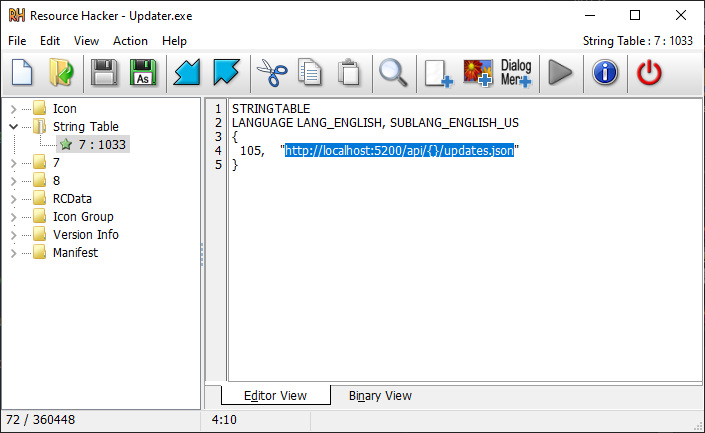
Doing so will break the executable signature
If you use this method, beware that this will invalidate the signature of the executable.
Consider re-signing the resulting binary, if possible or avoid this method altogether.
Advanced local configuration options
When using the local configuration file approach, additional instance fields give you fine-grained control over server discovery:
fallbackServerUrlTemplates— an array of additional URLs tried in order if the primary URL fails.filenameRegex— override the regex used to extractmanufacturerandproductfrom the executable name. Useful if your binary doesn't follow the defaultmanufacturer_product_Updaternaming convention.channel— sets an update channel name that is inserted as the third segment of the URL template (manufacturer/product/channel). It can also be supplied at runtime via--channel.network— configures proxy, DNS-over-HTTPS, and IP-family preferences.
See Local Configuration — Notable instance fields for full details and available sub-fields.